Introduction
Virtual reality has evolved far beyond gaming. Today, VR powers surgical training simulations at leading medical institutions, enables students to explore historical events in virtual classrooms, and helps architects walk clients through buildings before construction begins. According to MarketsandMarkets research, the global VR market reached USD 15.9 billion in 2024 and is projected to hit USD 38.0 billion by 2029—growing at 19.1% annually.
This explosive growth creates genuine opportunity for students willing to learn. VR development sits at a unique intersection: the tools are free, the learning resources are abundant, and the barrier to entry is lower than most people assume. Most students who get stuck do so not from lack of access, but from not knowing which first step to take.
This guide walks you through how to get started with VR development as a student — from understanding what the field actually involves, to choosing the right tools, building your first prototype, and putting your work in front of the right people.
Key Takeaways
- VR development creates immersive 3D experiences across gaming, healthcare, education, and architecture
- Free tools like Unity and WebXR mean students need no upfront budget to start building
- Master basic programming (C# or JavaScript), 3D thinking, and a game engine before tackling headset-specific features
- One finished VR project can strengthen university applications and get you shortlisted for internships
- Build one small project at a time, inside a community — progress compounds faster than you expect
What Is VR Development?
VR development is the process of designing and building software that creates immersive, interactive three-dimensional environments users can explore through headsets or browsers. Developers control both the visual world users see and the logic governing how they interact with it—whether grabbing objects, teleporting through space, or triggering events.
The applications extend well beyond entertainment:
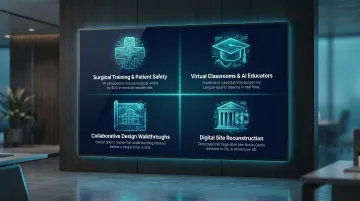
- SimX and Laerdal Medical partnered in 2024 to build VR surgical training that improves patient safety outcomes
- ENGAGE XR's virtual classroom platform lets students run virtual science experiments and learn from AI-driven educators
- Architects use platforms like IrisVR for collaborative design walkthroughs before breaking ground
- Researchers are digitally reconstructing cultural heritage sites like India's Ajanta Caves through VR
For students beginning their journey, two main development paths exist:
Game engine development uses platforms like Unity or Unreal Engine to create headset-based experiences for devices like Meta Quest, PlayStation VR2, and PCVR systems. This path dominates professional VR development.
WebXR development builds browser-based VR accessible without downloads or headsets. Defined by the W3C WebXR Device API specification, WebXR allows users to experience VR directly through compatible web browsers—ideal for students without hardware.
What Students Should Know Before Getting Started
VR development is more accessible than it looks. No computer science degree, no expensive headset, no years of coding background required — just a willingness to build things, break them, and iterate toward something that works.
Hardware Reality Check
Entry-level standalone headsets like the Meta Quest 3S start at USD 349.99 (roughly ₹29,000–₹30,000 when imported to India), which puts them out of reach for many beginners — and that's fine. Students can build and test complete VR projects using Unity's built-in emulator or WebXR in any modern browser, meaning you can start for free. Physical headsets enhance the experience but aren't a prerequisite.
The Multidisciplinary Challenge
VR development touches programming, 3D design, physics simulation, and user experience design simultaneously. Beginners often feel overwhelmed trying to master everything at once. The most effective approach: pick one starting point—usually programming basics or a beginner Unity tutorial—and build outward from there. Real projects make those connections for you — each one pulls in a new discipline at the exact moment it becomes relevant.
Why VR Development Is Worth Exploring Right Now
The timing favors early movers. Beyond the 19.1% global market growth, Grand View Research projects the VR-in-healthcare market alone will grow from USD 5.62 billion in 2024 to USD 29.38 billion by 2030—a 30.3% annual growth rate.
For students in India specifically, the opportunity is even sharper. Fortune Business Insights projects India's VR market will grow at 35.3% CAGR—among the fastest globally. In markets where immersive tech talent is nascent, students who develop skills now gain meaningful first-mover advantage.
Career and Creative Opportunity
VR development roles are emerging across edtech, healthcare simulation, enterprise training software, and architecture firms—not just gaming studios. The portfolio value matters tremendously: a working VR project signals to universities and employers that you can learn new tools independently, think spatially, and ship something real. This matters far more than certifications alone.
The question for most students isn't whether to start—it's how. Structured programs offer a faster path than solo learning. Maker's Asylum's Innovation School, for instance, gives students hands-on VR projects, mentorship from hardware entrepreneurs, and access to a maker community—cutting weeks off the trial-and-error that self-directed learners typically face.
Essential Skills and Tools for Beginner Students
Programming Foundations
C# is the most beginner-friendly language for VR development because Unity—the most widely used VR engine—uses it natively. Students with Python or JavaScript experience will adapt quickly. C++ powers Unreal Engine and is worth exploring later, but C# offers the most practical starting point.
You don't need to master programming before touching a game engine. The most effective approach is learning both in parallel—build small Unity projects while strengthening your C# fundamentals.
Game Engines: Unity vs. Unreal
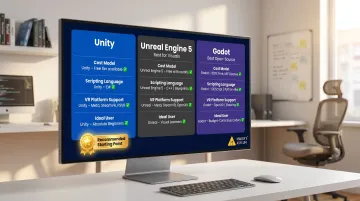
Unity is the recommended starting engine for most beginners:
- Free for personal use under USD 200,000 in annual revenue
- The most extensive tutorial library online
- Supports all major VR platforms including Meta Quest, PlayStation VR2, and Apple visionOS
- Lower learning curve for students new to game development
Unreal Engine 5 offers:
- Photorealistic visual quality using advanced rendering
- Free until you earn USD 1 million in product revenue
- C++ as the primary scripting language
- Better fit for students wanting cinematic-quality environments after gaining foundational experience
Godot is a third option worth knowing about:
- Completely free and open-source with no revenue restrictions or royalties
- No corporate dependency — the codebase is fully community-governed
- Smaller VR ecosystem than Unity or Unreal, but community support is growing steadily
3D Modeling Basics
You don't need to master 3D art, but understanding how to import, manipulate, and position 3D objects is essential. Blender is the recommended free tool — it's free to use with no licensing restrictions, has extensive free tutorials, and exports directly to Unity and Unreal via FBX format.
Platform and SDK Selection
Main platforms for student developers:
| Platform | Cost | Best For | Learning Curve |
|---|---|---|---|
| Meta Quest | ~USD 350 (not widely available in India; import pricing varies) | Standalone VR with most tutorials available | Moderate |
| PCVR | Requires powerful PC | Maximum capability and visual quality | Higher |
| WebXR | Free | Works across devices, no headset required for testing | Lower |
Most students should start with Unity + Meta Quest or WebXR, based on their hardware situation. Unity supports cross-platform development for all major VR devices through a single codebase.
Maker's Asylum's Innovation School program includes VR kits with Cardboard headsets shipped directly to students — so hardware access isn't a barrier when you're just getting started.
How to Get Started with VR Development: A Step-by-Step Path
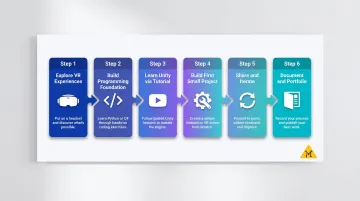
This progression moves you from curiosity to a completed first project — and the most common trap is spending too long researching before you build anything. Skip that. Start making.
Step 1 – Explore Existing VR Experiences First
Before writing code, spend time inside existing VR experiences—through a headset, a WebXR demo in your browser, or even YouTube 360-degree videos. Develop intuition for what makes VR feel immersive versus frustrating. This sparks specific ideas about what you want to build and why certain design choices matter.
Step 2 – Build a Programming Foundation
Start with C# basics using free resources:
- Unity Learn official tutorials
- freeCodeCamp C# courses
- Beginner YouTube tutorial series
Aim for two to four weeks of consistent practice—30 minutes daily beats sporadic three-hour sessions. The goal isn't fluency; it's enough understanding to read, modify, and troubleshoot simple scripts.
Step 3 – Learn Unity Through a Beginner VR Tutorial
Download Unity (free), install the Meta XR Core SDK or Unity's built-in XR toolkit, and follow an official beginner tutorial. Two excellent starting points:
- Unity's "VR Beginner: The Escape Room" – 3-hour guided project covering teleportation, object interaction, spatial audio, and VR UI
- Meta's "Hello VR" tutorial – Step-by-step guide for Meta Quest development from blank project to deployment
Focus on understanding scenes, game objects, components, and the build pipeline—not creating something impressive. Mastery comes through repetition across multiple projects.
Step 4 – Build Your First Small VR Project
Set a deliberately narrow scope:
- One interaction mechanic (grab and throw objects)
- One environment (single room)
- One clear goal (answer three questions, reach the exit, solve one puzzle)
Completing a small project matters far more than starting a large one and abandoning it. Use Unity's built-in VR templates to reduce setup friction. Projects like creating a virtual gallery where users teleport between paintings or a simple hide-and-seek game teach core concepts without overwhelming complexity.
Step 5 – Share, Get Feedback, and Iterate
Share your project with peers, online VR communities (Reddit's r/learnVRdev, Discord servers, local makerspace events), or platforms like SideQuest for Meta Quest apps.
Use feedback to make one or two specific improvements, then rebuild and share again. In structured maker environments like Maker's Asylum residencies, mentors and fellow makers review work in real-time — the kind of direct, specific critique that's hard to replicate through online forums alone.
Step 6 – Document Your Work and Build a Portfolio
Record short screen captures or video walkthroughs of each project. Write brief descriptions covering:
- What you built
- What you learned
- What you'd change next time
Publish on a personal website or GitHub. Two or three documented VR projects make strong impressions on university admissions panels and prospective employers — concrete proof that you can scope a problem, build something functional, and reflect on what you'd do differently.
Frequently Asked Questions
Is it hard to develop a VR game?
VR game development has a moderate learning curve. It's harder than building a basic web app, but far more accessible than it was five years ago. With Unity and structured tutorials, beginners can produce working VR prototypes within a few weeks of consistent learning.
Can Unity make VR games?
Yes. Unity is the most widely used game engine for VR development, supporting all major platforms including Meta Quest, PlayStation VR2, PCVR, and Apple visionOS. It's free for personal and educational use, making it the default recommendation for student beginners.
Is C++ used in VR?
C++ is primarily used through Unreal Engine, where it's the native scripting language. Beginners are usually better served starting with C# in Unity, then transitioning to C++ once they have a working grasp of game development concepts and want photorealistic rendering capabilities.
How much does it cost to develop a VR app?
Software tools—Unity, Blender, Meta XR SDKs—are free for students. The main cost is hardware. You can start with zero cost using Unity's emulator or WebXR. A Meta Quest 3S headset (around ₹30,000) is the most affordable entry point for physical testing.
What are the 5 applications of VR?
Key VR application areas include gaming and entertainment, education and training simulations, healthcare (surgical training and therapy), architecture and real estate visualization, and social collaborative virtual environments. Gaming and healthcare simulation currently offer the most active hiring for VR developers.
What is the 20-20-20 rule for VR?
The American Optometric Association recommends the 20-20-20 rule: every 20 minutes of headset use, look at something 20 feet away for 20 seconds. This reduces eye strain during extended VR development and testing sessions.
Ready to start building? Pick one tutorial, block out three hours this week, and build something tangible. Your first prototype doesn't need to be polished — it just needs to exist. The making community grows every time someone ships their first build.