Introduction
Picture a student learning about ancient Rome. In a traditional classroom, they flip through a textbook, squinting at small illustrations of marble columns and dusty amphitheaters. Now imagine that same student slipping on a VR headset and stepping directly into the Roman Forum—turning 360 degrees to see vendors shouting, citizens debating, and the Colosseum towering in the distance. This is the promise of virtual reality in education: transforming abstract knowledge into visceral, immediate experience.
The practical challenge for schools, parents, and students is this: with dozens of VR programs flooding the market, how do you tell genuinely effective learning tools from high-tech novelties? Not all immersive experiences translate to measurable outcomes.
This guide helps you identify VR programs that actually deliver—backed by research, aligned to curriculum standards, and designed to complement hands-on learning rather than replace it.
Key Takeaways
- VR learning programs place students inside simulated environments using headsets or screen-based 3D tools for subjects like science, history, and geography
- Research shows VR students increase knowledge retention by 35% compared to 3% for traditional methods, with large effect sizes across multiple studies
- Popular platforms include Labster (browser-based science labs), XReady Lab (used in 800+ schools), and CoSpaces Edu (supports curriculum integration across age groups)
- Health guidelines recommend 10-15 minute sessions for ages 12-15 with 30-minute breaks; hardware costs range from ₹33,000–₹52,000 per headset
- VR works best when paired with physical making: simulated exploration followed by real-world prototyping deepens retention
What Are VR Programs for Students?
VR learning programs are software experiences designed to place students inside simulated environments—whether a virtual chemistry lab, a historical battlefield, or the surface of Mars—using VR headsets, controllers, and spatial audio. This differs fundamentally from watching a video on a tablet or clicking through a slideshow. In VR, students don't observe content passively; they inhabit it, look around freely, and interact with objects as if physically present.
Three Main Format Categories
Students encounter VR education in three distinct formats, each serving different school budgets and access contexts:
| Format | Hardware Required | Immersion Level | Example Use Case |
|---|---|---|---|
| Fully Immersive | VR headset (Meta Quest, HTC Vive) | 360° environment with head tracking | Walking through a virtual dissection lab |
| Semi-Immersive | Desktop/laptop with 3D display or stereoscopic glasses | Partial immersion via screen | Manipulating molecular structures with a stylus (zSpace) |
| Web-Based/Mobile | Browser, tablet, or smartphone | Non-immersive 3D exploration | Conducting virtual chemistry experiments (Labster) |
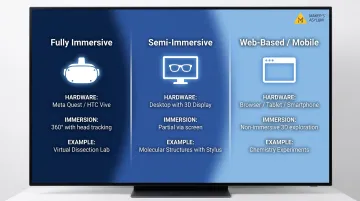
Fully immersive VR blocks out the real world entirely using a head-mounted display. Students experience complete spatial presence: turning their head changes their viewpoint naturally, and controllers allow hand interaction with virtual objects. Semi-immersive platforms like zSpace use proprietary displays with stylus input and 3D glasses, creating depth perception without full isolation.
Web-based VR runs in any browser, making it accessible on existing school devices without additional hardware investment.
Content Types: Ready-Made vs. Student-Created
"VR programs for students" encompasses two categories:
Ready-made educational content includes virtual field trips (touring the Anne Frank House, exploring coral reefs), science simulations (mixing chemicals without real-world danger), and historical reenactments (witnessing key events from a first-person perspective).
Creation tools let students build their own VR experiences. Platforms like Delightex Edu (formerly CoSpaces Edu) enable students to design 3D worlds, code interactions, and publish VR environments—particularly valuable for STEAM learners interested in game design, spatial storytelling, and programming.
How VR Enhances Learning: The Science Behind Immersive Education
Experiential Learning Through Active Participation
VR aligns naturally with Kolb's Experiential Learning Cycle, which moves through four stages: concrete experience, reflective observation, abstract conceptualization, and active experimentation. Traditional classroom instruction typically jumps straight to abstract concepts — formulas, theories, definitions — without grounding students in experience first.
VR reverses that sequence. Students begin with the concrete experience: conducting a virtual chemistry reaction, witnessing a historical event, or navigating a biological system. Reflection, conceptualization, and experimentation follow within that same immersive context.
Students aren't passive observers; they're participants making decisions inside the environment. A 2025 study of 317 students aged 14-18 in El Salvador found the VR group increased knowledge retention by 35.2% compared to just 2.6% for the non-VR group. Motivation—measured by satisfaction, attention, and relevance—remained stable in the VR group while declining in the control group. This contrasts sharply with passive content consumption, where students watch or read without interactive engagement.
The Role of "Presence" in Memory Formation
Presence—the psychological sense of actually being somewhere—is VR's unique educational advantage. When students feel present in a virtual dissection lab or a historical event, emotional memory activates alongside cognitive memory, making learning more durable.
Two recent studies put numbers to this effect:
| Study | Key Finding | Effect Size |
|---|---|---|
| Loenne et al. (2023) — 134 university students | Immersive VR (HMD) produced significantly higher sense of presence and positive affect than desktop VR | d = 0.99 (large) |
| Yu et al. (2025) | High immersion improved declarative knowledge and procedural knowledge | d = 0.85 / 0.89 (large) |
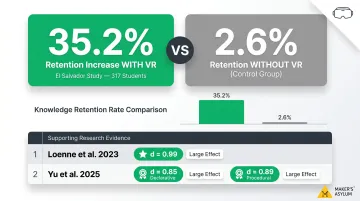
The mechanism at work is embodied cognition — the idea that learning is tied to physical sensation and perceived presence. When the brain registers "I am here," it encodes the experience more like a real memory than a lesson, which is why VR-based learning tends to stick beyond the test.
Supporting Different Learning Styles
VR supports differentiated learning by engaging students who struggle with text-heavy materials or abstract concepts through spatial and kinesthetic interaction. A 2025 study of 44 students aged 10-15, including students with Autism Spectrum Disorder, found VR STEM environments supported cognitive, social, and behavioral development. Students with ASD and typically developing peers both benefited from immersive scenarios covering the Solar System, Rock Cycle, Water Cycle, and Photosynthesis.
This matters for students who learn best through:
- Visual-spatial exploration rather than reading lengthy explanations
- Hands-on manipulation of 3D models and objects
- Contextual problem-solving within realistic scenarios
- Self-paced discovery without time pressure from peers
Safe Failure and Fearless Experimentation
VR creates "safe failure" environments where students can make mistakes—mix the wrong chemicals, misjudge a structural load, navigate a social scenario incorrectly—without real-world consequences. This lowers the psychological barrier to experimentation and builds confidence.
In a traditional chemistry lab, students hesitate to experiment — fear of wasting materials, causing accidents, or getting it wrong holds them back. In VR, those barriers disappear. They test hypotheses freely, see outcomes immediately, and try again.
That's the same logic behind the "make, break, create" approach to hands-on STEAM education: mastery comes from cycles of trial, error, and refinement — not from one-shot performance under evaluation pressure.
Key Subject Areas Where VR Is Changing How Students Learn
Science and STEM
VR transforms science education by enabling students to conduct virtual dissections, explore molecular structures at human scale, and simulate physics experiments impossible in a standard classroom. XReady Lab serves 800+ schools worldwide with VR simulations for biology, physics, chemistry, and math, aligned to IB, AP, GCSE, and K-12 standards. Students use Meta Quest headsets or access simulations via web browser, with an AI Tutor providing guided support.
Each subject area opens up experiences that classrooms simply can't replicate:
- Biology: Students dissect organisms without ethical concerns or material costs
- Chemistry: Mix reagents and observe reactions at the molecular level, zooming in to watch atomic bonds form and break
- Physics: Manipulate variables like gravity, friction, and velocity in real-time and observe results instantly
History and Social Studies
Traditional history education struggles to make the past feel real. Walking through ancient civilisations, witnessing key events from a first-person perspective, and exploring distant regions create emotional connections that textbooks simply can't match.
The Anne Frank House VR experience demonstrates this well. Available free on Meta Quest, Steam, and other platforms, the 25-minute experience places students inside the Secret Annex where Anne Frank and her family hid during World War II.
YBI's Explore VR programme delivered this experience to over 1,400 students across Northeast Ohio. Teachers reported students felt they were "standing in" history rather than reading about it — struck by how small the hiding space actually was, a spatial reality impossible to convey through text or 2D images.
Geography and Environmental Science
VR enables students to "visit" ecosystems they'd never otherwise access—coral reefs, arctic tundra, rainforests—and observe environmental change over time. Blueplanet VR Explore offers over 40 volumetric 3D scenes of geographic and cultural heritage locations worldwide, designed specifically for virtual field trips in geology, geography, and environmental science.
National Geographic Explore VR allows students to explore Antarctica and Machu Picchu, used by educators as part of National Geographic's Grosvenor Teacher Fellowship programme. These experiences give students access to remote locations and endangered ecosystems, building environmental empathy and scientific understanding through direct — if virtual — observation.
Arts and Creative Skills
VR enters arts education through 3D sculpting and spatial painting tools, virtual museum tours guided by curators, and interactive cultural experiences. Students both consume and create art in new dimensions.
Google's Tilt Brush, used at Brown University and the University of Wisconsin-Platteville, enabled students to paint in three-dimensional space using VR controllers. After Google discontinued Tilt Brush, it was open-sourced and continues as Open Brush, maintaining the same functionality. Students move between consuming museum experiences and creating original spatial art, making VR a natural fit for STEAM programmes that blend creative and technical thinking.
Language and Cultural Learning
Language learning gains a new dimension in VR, placing students inside real conversational contexts that classroom role-play can't match.
ImmerseMe, used by over 150,000 language learners in 30+ countries, offers 12 languages through 360-degree video and speech recognition. Students practise in realistic settings and receive immediate feedback on pronunciation and comprehension:
- Ordering food in a Paris café
- Navigating a Tokyo train station
- Shopping in a Madrid market
Institutional users include Louisiana State University, Tulane University, and Kerikeri High School in New Zealand.
Popular VR Platforms and Programs for Students
Purpose-Built Educational Platforms
| Platform | Subject Focus | Age Range | Hardware Required | School Adoption |
|----------|---------------|-----------|-------------------|-----------------|
| zSpace | STEM, CTE, SEL | K-12 + Workforce | Proprietary display (stylus + glasses, no HMD) | 2,500+ organizations; 94% of top 100 U.S. school districts |
| Labster | Biology, Chemistry, Physics, Health Sciences | High school + Higher Ed | Browser only (no headset) | Multiple named U.S. high schools including Modesto School District (CA), West Ranch High School (CA) |
| Delightex Edu | Cross-curricular (STEM, storytelling, coding) | K-12 (ages 5-18) | Browser; also tablets, phones, VR headsets | 3M+ users in 174 countries |
| XReady Lab | Biology, Physics, Chemistry, Math | K-12 | VR headsets or web/PC browser | 800+ schools worldwide |
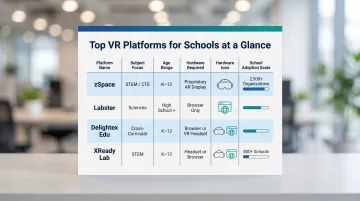
zSpace stands out as the purpose-built educational platform with teacher dashboards, standards-based curriculum alignment, and managed classroom deployment. It uses semi-immersive AR/VR technology, where students wear lightweight 3D glasses and use a stylus to manipulate holographic objects on a specialized display. This approach eliminates the motion sickness and isolation concerns of full headsets while maintaining spatial interaction.
With 300+ interactive simulations across biology, chemistry, physics, and health sciences, Labster runs entirely in the browser — no VR headset required. That makes it the most accessible option for schools with existing computers but no VR hardware budget.
Delightex Edu (formerly CoSpaces Edu) is a VR/AR creation platform where students build their own immersive experiences, code interactions, and publish projects. It's particularly valuable for STEAM learners interested in game design, storytelling, and computational thinking.
Consumer Platforms with Educational Content
Meta Quest (consumer VR headset) includes some educational content via the Meta for Education program, but it differs from purpose-built platforms. Meta Quest offers broader app access and higher immersion but lacks the pedagogical scaffolding, curriculum alignment, and teacher dashboards that zSpace or Labster provide. Schools must evaluate whether they prioritize curated content (purpose-built platforms) or flexibility and immersion (consumer headsets).
Google Expeditions Successor Landscape
Google discontinued Expeditions on June 30, 2021. Three platforms have since filled that gap:
- Google Arts & Culture — received migrated Expeditions content and offers free virtual tours
- VR Expeditions 2.0 by RobotLAB — launched in partnership with Encyclopedia Britannica as a direct replacement
- ClassVR — standalone headsets with a classroom-ready content management system
Cost Accessibility and Hardware Barriers
High-end VR headsets remain a barrier for many schools, but entry-level options and browser-based platforms are expanding access:
Education-priced VR headsets:
- Meta Quest 3S: approximately ₹33,000 (128GB) to ₹41,500 (256GB) per headset
- Meta Quest 3: approximately ₹52,000 per headset
- These prices include the Meta for Education management license
- A 30-headset classroom setup costs approximately ₹12.5 lakh–₹18 lakh first-year budget including content and management
Browser-based platforms (zero hardware cost):
- Labster, Delightex Edu, and A-Frame require only existing school devices
- Students access VR experiences through web browsers on laptops, tablets, or smartphones
- Ideal for schools with limited budgets or piloting VR before committing to hardware
Google stopped selling Cardboard viewers in March 2021, though third-party manufacturers can still produce compatible viewers using the open-sourced design. However, standalone headsets like Meta Quest 3S now offer significantly better experiences at increasingly accessible price points.
Challenges and Limitations of VR in Education
Hardware and Cost Barriers
Dedicated VR headsets represent a real expense for schools and families. At ₹33,000-52,000 per education headset, equipping a single classroom of 30 students requires a first-year investment of approximately ₹12.5L-18L, excluding ongoing costs for content licenses, device management software, hygiene accessories, and IT support.
This creates inequity in access, particularly for students in emerging markets and lower-income schools. While browser-based alternatives eliminate hardware costs, they sacrifice the immersion that drives VR's strongest learning outcomes, creating a trade-off between accessibility and effectiveness.
Physical and Health Considerations
Motion sickness (cybersickness) affects some users, especially with prolonged use or lower-quality hardware. Children's Hospital Los Angeles (2025) recommends:
- Ages 12-15: 10-15 minute sessions
- Ages 16-17: Up to 20 minutes
- Break requirement: At least 30 minutes between sessions
- Bedtime rule: Stop all VR use at least 2 hours before bedtime
The AAP (2026) advises "reasonable time limits" and "substantial breaks" of approximately 15 minutes. Most VR headset manufacturers recommend use for children aged 12 or 13 and older, partly because headsets are not designed for smaller faces and may cause eye strain or nausea.
A 2020 study of 50 children aged 4-10 found that 46 of 50 children (92%) completed the entire study without significant issues. Of the four who stopped, three girls reported mild motion sickness and one boy cited boredom. While most children tolerate VR well, schools must plan short sessions and monitor for discomfort.
Pedagogical Limitation: Complement, Not Replacement
Those session-length constraints point to a deeper design principle: VR works best as one component within a broader lesson, not the whole lesson. Over-reliance on any single medium limits development of critical thinking, hands-on problem-solving, and collaborative skills students need.
The AAP cautions against VR "crowding out other important activities" and flags the risk of "fantasy-reality blurring," where children may confuse VR events with real-life memories. A blended approach keeps VR in its strongest role:
- Introduce — use VR immersion to open a concept or build context
- Reinforce — follow with classroom discussion, writing, or debate
- Extend — deepen understanding through hands-on physical experimentation
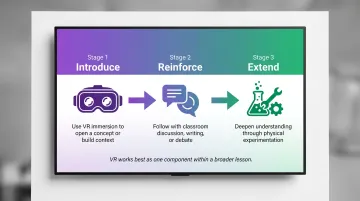
The Anne Frank House VR experience shows how VR works best as a capstone, not an entry point. It was the culmination of a comprehensive 8th-grade unit spanning literature, history, film, and stage performances — not a standalone lesson.
Combining VR with Hands-On Learning for Deeper Impact
The most effective student learning happens when VR pairs with physical making and real-world problem-solving. A student who virtually explores a mechanical system and then builds a working prototype of it retains and applies knowledge at a far deeper level. This is the core idea behind maker education: digital exploration should lead to physical creation.
Consider a student learning about circuits. In VR, they assemble a virtual circuit, observe current flow, and test different configurations. This builds conceptual understanding. But when they solder actual components, troubleshoot connection failures, and measure voltage with a multimeter, they develop practical capability—muscle memory, tactile feedback, and problem-solving confidence that simulation alone cannot replicate.
Programs like Maker's Asylum's Innovation School are designed around exactly this principle. Students don't just learn about technology through screens or simulations. They build, prototype, and experiment with real tools and materials at the organization's 10,000+ sq ft makerspace facility in Moira, Goa.
The Innovation School runs on a three-phase hybrid model:
- Online skill-building: Students develop digital skills in CAD & 3D Design, Electronics & Robotics, PCB Design, and Internet of Things
- Hardware kit delivery: Physical components ship directly to students' homes for hands-on experimentation before they arrive
- 7-day intensive residency: Students apply design thinking, frugal innovation, and rapid prototyping to build functional solutions to real-world problems
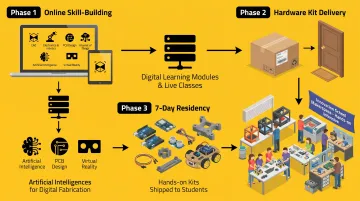
During the residency, students move from digital design to physical fabrication using woodworking tools, 3D printers, laser cutters, soldering stations, and microcontroller programming. Working alongside mentors, they refine prototypes through iterative cycles of testing, breaking, and rebuilding.
The results speak for themselves: alumni have gone on to study at MIT, Stanford, Columbia, Imperial College London, and other leading universities — a direct outcome of the portfolio-worthy projects and problem-solving skills built through this model.
VR builds conceptual fluency. Physical making turns that understanding into capability. Neither is complete without the other — which is exactly why programs that combine both consistently produce students who are ready to create, not just consume.
Frequently Asked Questions
What are VR programs?
VR programs are software applications that generate immersive 3D environments students explore through a headset or compatible device. In education, they power virtual field trips, science simulations, and historical reenactments—letting students engage with concepts spatially rather than passively reading about them.
What is VR development?
VR development is the process of designing and programming virtual reality experiences using game engines like Unity or Unreal Engine and software development kits (SDKs). Students who want to build VR—not just use it—can start with beginner-friendly platforms like Delightex Edu or A-Frame.
What software is used to develop VR?
Common options include Unity (used in over 60% of VR content), Unreal Engine (for high-fidelity graphics), A-Frame (a web-based framework built on three.js), and Delightex Edu (formerly CoSpaces Edu) for beginners. None of these require advanced coding to get started.
What is VR in game development?
In game development, VR refers to creating interactive experiences where the player is placed inside the game world, using spatial audio, motion tracking, and real-time 3D rendering. Players interact naturally: turning their head shifts the viewpoint, and hand controllers let them interact with objects. Many students first encounter VR development through game design projects.
Can epileptics use VR?
Flashing lights and rapid visual transitions in some VR environments can trigger photosensitive responses. Individuals with epilepsy—especially photosensitive epilepsy—should consult a medical professional before using VR. Research reviewed in 2020 notes the overall risk is low, but schools should require parents to disclose seizure history and avoid VR content with rapid strobing or high-contrast flickering patterns.