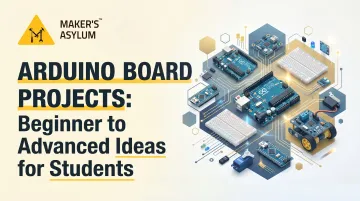
Introduction: Arduino Board Projects for Students — From Blinking LEDs to Building Robots
Picture this: you've just wired up a circuit, uploaded your first few lines of code, and watched an LED flash on command. That tiny blink represents more than a successful connection—it's proof that you can command hardware to do your bidding. For thousands of students worldwide, that first Arduino project is the gateway to robotics, IoT, environmental monitoring, and real-world engineering.
Arduino is a versatile, affordable platform that lets you build everything from plant-watering systems to gesture-controlled drones. This guide walks you through Arduino projects at three skill levels — beginner, intermediate, and advanced — covering sensors, automation, IoT, and robotics.
Whether you're new to electronics or building a portfolio for university applications, the best project is one that solves a problem you actually care about, not just the most impressive-sounding one.
Key Takeaways
- Arduino is a beginner-friendly microcontroller board that makes hands-on STEAM projects accessible to students at any skill level
- Start with simple sensor projects (LEDs, temperature displays), then progress to home automation and robotics
- Pick projects that solve real problems — the learning sticks faster when the goal actually matters to you
- Arduino uses simplified C/C++ through the Arduino IDE, backed by one of the largest open-source communities in electronics
- Hands-on Arduino projects strengthen university applications and build real engineering skills
Why Arduino Is the Go-To Board for Студент Makers
Why Arduino Is the Go-To Board for Student Makers
Arduino stands apart as the ideal entry point for student makers because it removes the traditional barriers to electronics learning. Official Arduino Uno R3 boards cost approximately ₹2,035–₹2,349 in India, while compatible clone boards start around ₹284–₹999. This accessibility, combined with the open-source hardware and software ecosystem, means students can start building for under ₹300.
The free Arduino IDE runs on Windows, macOS, and Linux, providing a simplified C/C++-based programming environment designed specifically for beginners. Popular boards like the Arduino Uno, Nano, and Mega each serve different complexity needs—Uno for breadboard learning, Nano for compact projects, and Mega for multi-sensor systems requiring more pins and memory.
Learning Outcomes That Matter:
Arduino projects deliver simultaneous learning across multiple disciplines:
- Grasp electronics fundamentals: voltage, current, circuit design, and component selection
- Build programming logic through variables, loops, conditionals, and real debugging
- Connect hardware components — sensors, motors, displays, and communication modules
- Think in systems: break complex problems into hardware-software solutions you can actually build
Research confirms the power of this approach. Active learning methods in STEM increased student performance by approximately 6 percentage points, and students in traditional lecture-only courses were 1.5 times more likely to fail compared to those engaged in hands-on learning. Arduino projects embody this principle—every build is a cycle of theory, application, troubleshooting, and iteration.

Where These Skills Take You:
Arduino competencies translate directly into career-relevant domains: IoT development, robotics engineering, embedded systems, and product prototyping. University admissions teams increasingly value portfolios of real projects over grades alone.
Demonstrating that you've built a functional GPS tracker or automated environmental monitor signals problem-solving ability, persistence, and genuine technical interest — the qualities that set applications apart at institutions like MIT, Stanford, IIT, and Cambridge.
The Arduino community spans tens of millions of makers globally, with 8,754+ libraries in the Library Manager and 6,000+ documented projects on Arduino Project Hub. Whatever you're building, someone in that community has likely faced the same wiring problem, error code, or sensor quirk — and documented the fix.
Beginner Arduino Projects to Start With
The best beginner projects share a few qualities: few components, clear outcomes, a build time of 1–3 hours, and an obvious real-world function. Mastering these fundamentals now prevents frustration later and gives you the confidence to tackle more complex builds.
LED Blink and Traffic Light Simulator
The classic "blink" project is the "Hello World" of Arduino. Wire one LED with a resistor to a digital pin, upload a sketch using digitalWrite() and delay(), and watch it flash. This introduces pinMode(), output control, and timing logic.
Once you've conquered the single LED, build a traffic light simulator using three LEDs (red, yellow, green):
- Red lights for 5 seconds
- Yellow lights for 2 seconds
- Green lights for 5 seconds
- Repeat cycle
This teaches timed state transitions without requiring sensors — the same logic you'll apply when building automated door locks, irrigation controllers, and traffic management systems later on.
Temperature and Humidity Display (DHT11 Sensor + LCD)
Wire a DHT11 sensor (operating voltage 3–5 V, temperature range 0–50°C, accuracy ±2°C) to your Arduino Uno and display real-time readings on a 16×2 LCD screen. Use an I2C adapter for the LCD to simplify wiring—only four wires instead of sixteen.
What you'll learn:
- Reading analog and digital sensors
- Installing and using Arduino libraries (DHT sensor library)
- LCD display control and formatting
- Real-time data presentation
This project has clear environmental applications—monitor classroom conditions, greenhouse temperatures, or bedroom humidity levels.
Automated Plant Watering System
Connect a soil moisture sensor to an Arduino, which controls a relay module connected to a water pump. When soil moisture drops below your set threshold, the Arduino activates the relay, which powers the pump.
Hardware loop:
- Soil moisture sensor reads moisture level
- Arduino compares reading to threshold value
- If moisture < threshold, Arduino sends HIGH signal to relay
- Relay closes circuit, powering water pump
- Pump delivers water until moisture > threshold
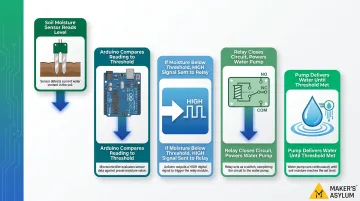
Beyond the household convenience, this project introduces threshold-based control logic — the same pattern you'll use in smart irrigation rigs, temperature-controlled fans, and industrial sensor arrays.
Ultrasonic Distance Meter (HC-SR04 + Display)
The HC-SR04 ultrasonic sensor measures distance by emitting 40 kHz sound pulses and timing the echo return. It works reliably from 2 cm to 400 cm with ±3 mm accuracy.
Display distance readings on an LCD or serial monitor. Along the way, you'll learn:
- How
pulseIn()measures pulse timing - Converting microseconds to centimetres in code
- Reusing the HC-SR04 as a sensing module in robots and radar systems
Motion-Activated Alarm (PIR Sensor + Buzzer)
Wire a PIR (Passive Infrared) motion sensor (detection range 3–7 m, output 3.3 V TTL) to trigger a buzzer when movement is detected. The PIR detects infrared radiation changes caused by human or animal movement.
To extend this project: Add an LED indicator and a reset button. When motion is detected, both buzzer and LED activate. Press reset to silence the alarm.
This introduces interrupt-based or polling logic, sensor threshold concepts, and basic security applications perfect for door monitoring or room entry alerts.
Intermediate Arduino Projects That Level Up Your Skills
Intermediate projects combine multiple components — sensors, displays, and communication modules — and require multi-function code with loops and conditionals. The results have clear practical utility, making them strong choices for school science fairs, portfolio entries, and university applications.
Bluetooth-Controlled Home Automation (HC-05 + Relay Module)
Pair an Arduino Uno with an HC-05 Bluetooth module (Bluetooth v2.0 + EDR, UART interface) and a relay board to control lights or appliances via smartphone.
How it works:
- Install a Bluetooth terminal app or use MIT App Inventor to create a custom Android app
- App sends serial commands (e.g., "1" = ON, "0" = OFF) via Bluetooth
- HC-05 receives commands and sends them to Arduino via serial communication
- Arduino reads commands and controls relay switching
- Relay switches mains-powered devices on/off
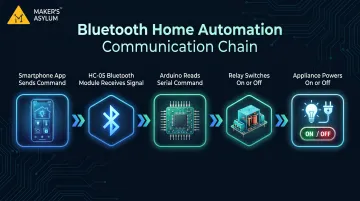
Building this gives you a working grasp of IoT principles without Wi-Fi complexity, and serial communication between phone and Arduino is a core skill that shows up in almost every connected device project you'll tackle next.
Arduino Radar / Sonar System (HC-SR04 + Servo Motor + Processing IDE)
Mount an HC-SR04 ultrasonic sensor on a servo motor and rotate it 180 degrees to create a radar sweep that maps detected objects on a PC screen using the Processing IDE.
Components and skills:
- Servo motor control with the Servo library
- Continuous distance measurement during rotation
- Serial data transmission from Arduino to PC
- Processing IDE for data visualization (creates radar-style graphical display)
The output is a live radar display showing object positions sweeping across your screen in real-time — exactly the kind of visual that stops people at science exhibitions and starts conversations.
Smart GPS Asset Tracker (Neo-6M GPS Module + GSM/LCD)
Build a tracker using the Neo-6M GPS module (horizontal accuracy 2.5 m, 50-channel receiver, NMEA 0183 protocol) that reads latitude/longitude coordinates and either displays them on an LCD or transmits them via GSM to a phone number as an SMS.
Real-world applications:
- Vehicle tracking
- Belongings recovery
- School equipment monitoring
- Field trip safety tracking
This project introduces NMEA data parsing (extracting GPS coordinates from data strings), serial communication with GPS modules, and location-based logic — skills directly applicable to logistics and fleet management systems.
RFID Door Lock Security System (MFRC522 + Servo/Solenoid Lock)
Use the MFRC522 RFID reader (13.56 MHz, ISO/IEC 14443 A, MIFARE compatible) to authenticate RFID cards and control a servo or solenoid lock, simulating a keycard entry system.
Implementation steps:
- Enroll authorized RFID card UIDs in Arduino memory
- When card is scanned, MFRC522 reads UID
- Arduino compares scanned UID to authorized list
- If match found, unlock servo/solenoid for 5 seconds
- Optional: log access attempts to SD card with timestamp
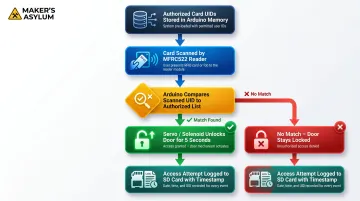
Students encounter this exact logic every day — dorm rooms, lockers, lab access cards. Rebuilding it from scratch makes the authentication principles behind enterprise security systems concrete and immediately understandable.
Wireless Weather Station (DHT22 + NRF24L01 + TFT Display)
Build a two-unit system: an outdoor unit with a DHT22 sensor (temperature range -40 to +80°C, ±0.5°C accuracy, humidity 0–100% RH) transmitting data wirelessly via nRF24L01+ transceiver (2.4 GHz, 250 kbps/1 Mbps/2 Mbps data rates) to an indoor unit displaying readings on a TFT screen alongside RTC-based time.
Skills developed:
- Wireless communication protocols (2.4 GHz ISM band)
- Data packaging and transmission between two Arduinos
- Multi-sensor integration (DHT22 + RTC + display)
- Power management for outdoor battery operation
Two Arduinos talking to each other wirelessly while logging live environmental data is a significant jump in complexity — and exactly the kind of distributed sensor architecture used in agricultural monitoring, smart buildings, and climate research.
Advanced Arduino Projects for Ambitious Student Makers
Advanced Arduino projects combine mechanical design, multiple communication protocols, and careful power management to solve real engineering problems. Done well, they're the kind of work that stands out in engineering college applications and innovation competitions.
Robotic Arm with Smartphone Control (Servo Motors + Bluetooth/Android App)
Design a 3D-printed or cardboard 5-DOF (degrees of freedom) robotic arm controlled by five servo motors driven from an Arduino Nano, with HC-05 Bluetooth enabling smartphone control via custom app.
Key skills you'll build:
- Inverse kinematics basics (calculating joint angles to reach target positions)
- Servo library usage for precise angle control
- Custom Android app for intuitive control interface
- Mechanical design for structural stability and smooth movement
The same servo-and-controller architecture powers real industrial arms used in manufacturing and surgical robotics. At Maker's Asylum's Innovation School, participants with access to MakerBot Replicator 2 printers and hands-on mentorship regularly take projects like this from concept to working prototype within a single residency.
Density-Based Traffic Light Controller (HC-SR04 Sensors + Arduino Mega + RGB LEDs)
Build an intelligent traffic signal that uses four ultrasonic sensors to detect vehicle density in four lanes and dynamically adjusts green light timing:
- 10 seconds green if vehicles detected
- 2 seconds green if lane empty
Use two Arduino boards communicating via I2C to manage all four lanes simultaneously.
Why this matters:
Traditional fixed-timer traffic lights cause congestion during uneven traffic flow. This project demonstrates engineering thinking by solving a real urban problem aligned with SDG 11 (Sustainable Cities). The multi-board I2C communication teaches distributed system architecture used in industrial automation.
DIY Air Quality Monitor (MQ Sensors / PM2.5 Sensor + OLED + Optional IoT)
Build a portable device using gas sensors—MQ-135 for CO₂/VOC detection (range 10–1,000 ppm) or PMS5003 for PM2.5 particulate measurement (range 0–500 µg/m³, resolution 1 µg/m³)—connected to an Arduino and displayed on an OLED screen.
Add an ESP8266 to log data to ThingSpeak for cloud-based IoT monitoring and historical trend analysis.
For students in Indian cities dealing with poor air quality, this project has immediate real-world relevance — you're not just learning sensors, you're building something useful. It aligns with SDG 3 (Good Health) and SDG 11 (Sustainable Cities).
Maker's Asylum students have built nearly identical tools: MakerBee (an AQI monitoring circuit board) and AQeye (a wearable air quality device using Arduino Nano and ESP8266 with PM2.5 sensors) show exactly how these skills translate into public health solutions.
Gesture-Controlled Robot / Vehicle (MPU-6050 + NRF24L01 + Arduino)
This project has two parts. The first is a wearable transmitter built around an MPU-6050 accelerometer/gyroscope (±2/±4/±8/±16 g accelerometer range, ±250/±500/±1000/±2000 dps gyroscope range) worn on your hand. It sends tilt and motion data wirelessly via nRF24L01 to a receiver that controls a robot car or robotic arm.
Technical challenges:
- Reading raw accelerometer and gyroscope data from MPU-6050
- Filtering noisy sensor data with complementary or Kalman filters
- Mapping hand tilt angles to motor speed/direction values
- Reliable wireless transmission with error handling
Maker's Asylum students have taken this further, building gesture-controlled drones where hand-mounted gyroscope sensors paired with ESP-NOW wireless communication translate wrist tilts directly into drone flight commands. It's a strong demonstration of multi-system integration — exactly the kind of project that makes a university application portfolio memorable.
How to Choose the Right Arduino Project (and Actually Finish It)
Don't pick the most complex project—pick the right one. Ask yourself: "What problem do I want to solve, or what skill do I want to learn?"
Match project difficulty to learning goals:
- LED/sensor projects: Understanding digital and analog I/O, basic programming logic
- Motor projects: Mechanical control, PWM, power management
- Wireless projects: Communication protocols, data serialization, debugging RF issues
- IoT projects: Cloud platforms, data handling, API integration
Choosing a project aligned with genuine curiosity dramatically increases completion rate. Passion sustains you through debugging sessions and design iterations.
Essential starter kit for students:
- Arduino Uno or Nano board (₹284–₹2,349 depending on official vs. clone)
- Breadboard and jumper wires
- Basic sensor kit: HC-SR04 ultrasonic, DHT11 temperature/humidity (₹109), IR sensor
- LEDs, resistors, push buttons
- Free Arduino IDE
Most beginner and intermediate projects cost under ₹1,500–₹3,000 in components. Online Indian retailers like Robu.in and Amazon India offer affordable kits and individual components with fast shipping.
Solo learning gets you started — but when you hit a wall, having a mentor and the right tools nearby makes all the difference.
Accelerate Learning Through Structured Programs
Maker's Asylum's Innovation School pairs students with experienced mentors, connects them with a community of peers building real projects, and provides access to a makerspace lab in Goa equipped with 3D printers, laser cutters, soldering stations, and component libraries.
The Innovation School uses a three-phase progression framework:
- Online skills foundation (60 hours): Electronics & Microcontrollers with Arduino Nano, IoT programming, PCB design, CAD for fabrication
- Pre-residency collaboration (10 hours): Project ideation, mentor pairing, Bill of Materials creation
- 7-day onsite immersion: Intensive hands-on prototyping at the Goa makerspace
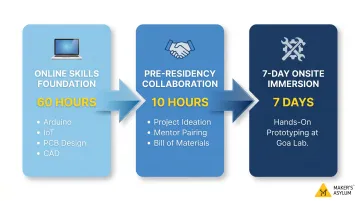
This hybrid model moves students from first LED blink to a finished, portfolio-worthy project — faster than solo learning allows. Students leave with a working prototype, documented build process, and the confidence to tackle the next problem on their own.
Frequently Asked Questions
What projects can I do with Arduino boards?
Arduino supports projects ranging from simple LED flashers and sensor displays for beginners to home automation systems, GPS trackers, robotic arms, and IoT environmental monitors for advanced users. The best project depends on your current skill level and what problem you want to solve.
What projects can I build with an Arduino Nano?
The Arduino Nano is a compact, breadboard-friendly board ideal for space-constrained projects like wearables, robotic arms, camera sliders, and portable sensor devices. Virtually all Uno-compatible projects work on a Nano with minor pin adjustments, making it perfect for embedded applications.
Can an Arduino run AI?
Standard Arduino boards (Uno, Nano) have limited processing power for AI. However, the Arduino Nano 33 BLE Sense and Arduino Portenta H7 support TensorFlow Lite for embedded machine learning applications like gesture recognition and keyword spotting, enabling real AI at the edge.
Does NASA use Arduino?
According to Arduino's blog, Arduino and XBee hardware were used in NASA wireless experiments aboard a Black Brant IX sounding rocket launch in 2015. That's the most well-documented instance of Arduino hardware making it to space.
What programming language does Arduino use?
Arduino uses a simplified version of C/C++ through the Arduino IDE. The language includes beginner-friendly built-in functions like setup(), loop(), digitalWrite(), and analogRead(), making it accessible even for students with no prior coding experience.
Can Arduino run Python?
Arduino's native language is C/C++, but MicroPython works on select boards like the Portenta C33 and Nano RP2040 Connect. You can also control an Arduino from Python on a PC using pySerial for serial communication.