TLDR:
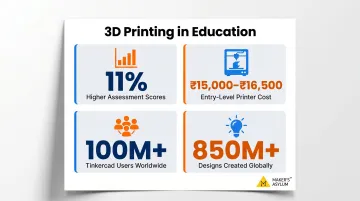
- Students using 3D printed models score approximately 11% higher on assessments than peers using traditional 2D methods
- 3D printing teaches spatial reasoning, CAD literacy, design thinking, and resilience through productive failure
- Projects range from beginner organizers and fraction blocks to advanced assistive devices and community problem-solving prototypes
- Free tools like Tinkercad (100 million users, 850 million designs) make 3D printing accessible to any student
- The real learning happens when students design from scratch, not just print downloaded files
Why 3D Printing Belongs in Every Student's STEAM Journey
3D printing bridges the gap between abstract concepts and tangible understanding. A printed gear mechanism teaches mechanical advantage more effectively than any diagram. Students using 3D printed models scored 73.41% on assessments compared to 62.63% for control groups—approximately 11% higher—according to a 2022 meta-analysis covering 723 students. The effect size was statistically significant (Hedge's g = 0.742, p < 0.001), confirming that physical models dramatically improve comprehension.
3D printing is inherently interdisciplinary—a single project routinely draws from multiple subjects at once:
- Engineering: structural design and load distribution
- Mathematics: calculating volume, dimensions, and tolerances
- Art: aesthetics, form, and surface finishing
- Science: material properties and thermal behavior
That's what makes it such a natural fit for STEAM education: students don't just learn subjects in isolation—they apply them together to solve a real problem.
The barrier to entry has also dropped considerably. Entry-level FDM desktop printers now cost ₹15,000–₹16,500, while PLA filament runs ₹1,250–₹3,300 per kilogram. Free CAD software like Tinkercad—used by 100 million students who've created 850 million designs—means students don't need expensive labs or specialized training to begin making.
Skills Students Build Through 3D Printing Projects
Spatial Reasoning and Geometry
Designing in three dimensions forces students to think about depth, volume, and structure in ways 2D diagrams cannot replicate. Research confirms that 3D printed models and CAD software produce statistically significant improvements in spatial visualization compared to traditional 2D drawings. For students with low spatial ability, 3D technologies act as a "cognitive prosthetic," enabling greater gains than static images alone.
This builds intuitive understanding of shapes, tolerances, and proportions. Students learn why a wall that's 1 mm thick collapses during printing, or why a clearance gap of 0.2 mm allows moving parts to function smoothly—lessons that stick because they're learned through direct experience.
Design Thinking and Iteration
Students rarely get the first print right. Walls are too thin, pieces don't fit, joints fail. This natural iteration cycle—design, print, test, revise—teaches resilience and analytical thinking. A 2021 study of middle school students found that 3D printing failures were "productive" because they inspired greater perseverance and deeper learning. When a print fails, students shift focus from completing the task to understanding why it failed—genuine problem-solving.
CAD and Digital Literacy
Learning tools like Tinkercad, Fusion 360, or FreeCAD introduce students to professional software environments used across product design, architecture, engineering, and manufacturing careers. The skills transfer directly into real-world workflows.
The demand for CAD-literate talent is growing fast. The U.S. Bureau of Labor Statistics projects 9% growth for mechanical engineering jobs (2024–2034), and Autodesk's Career Readiness Report found that 58% of professionals cite lack of skilled talent as a barrier—with 61% saying it's getting harder to find hires with the right technical skills. Students who build CAD skills early open doors that most applicants reach only after years of industry experience.
Problem-Solving with Real Constraints
When students design for a specific function—a custom pen holder, a replacement part, a science model—they learn to balance aesthetics, strength, and material limits. A pen holder that looks beautiful on screen but tips over when loaded with pens teaches more about design constraints than any lecture could. Professionals call this the gap between form and function—students discover it firsthand.
Collaboration and Communication
3D printing rarely stays solo for long. In makerspace environments, students who document their process, present iterations, and give peer feedback build communication skills that carry well beyond the printer. Knowledge-sharing accelerates learning for everyone involved:
- Explaining a failed print forces students to articulate their reasoning
- Peer feedback surfaces blind spots that self-review misses
- Shared troubleshooting builds a collective knowledge base over time
- Presenting design decisions prepares students for engineering and portfolio reviews
3D Printing Projects by Skill Level
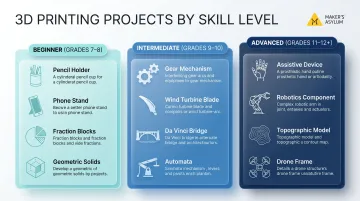
Beginner Projects (Grades 7–8)
Start with functional organizers that teach measurement and basic geometry:
- Custom pencil holder - Students measure their desk space, design for specific pen diameters, and learn the difference between a design that looks good on screen and one that works in real life
- Phone stand - Introduces angles, stability, and weight distribution
- Modular desk tray - Teaches interlocking parts and assembly tolerances
Educational models for classroom subjects work exceptionally well:
- Fraction blocks for math - Physical representations of halves, quarters, eighths make fractions tangible
- Simplified Earth puzzle for geography - Continents that fit together teach spatial relationships
- Geometric solids - Cubes, pyramids, and spheres provide hands-on geometry learning
Print-in-place beginner models (articulated animals, fidget toys) build confidence fast. They print with moving parts already assembled, demonstrating layer-by-layer printing without requiring post-print assembly or complex design knowledge.
Once students are comfortable with single-part prints and basic tolerances, they're ready to tackle multi-component builds and real engineering constraints.
Intermediate to Advanced Projects (Grades 9–12 and Beyond)
Subject-integrated engineering projects challenge advanced students:
- Working gear mechanism - Demonstrates mechanical advantage with interlocking gears that actually rotate
- Wind turbine blade prototype - Explores renewable energy, aerodynamics, and efficiency testing
- Da Vinci bridge model - Studies structural integrity using interlocking pieces without fasteners
Human-centered design challenges require multi-part assemblies and precision:
- Assistive device prototype - Students design solutions for specific accessibility needs
- Custom robotics component - Teams create specialized parts for school robotics competitions
- Scale architectural model - Requires tolerance precision across multiple printed components
The most memorable projects solve problems students actually face. Examples include:
- Water bottle holder for classroom desks (solves an actual school problem)
- Custom lab equipment holder (improves science classroom organization)
- Topographic model of local landscape using real geographic data (applies GIS data to physical fabrication)
Subject-Specific 3D Printing Project Ideas for School
Science and Biology
Some of the strongest science projects give students something to hold—not just observe:
- Cross-section of human heart — Students hold chambers and valves in their hands, tracing blood flow pathways directly
- Frog anatomy kit — A humane alternative to dissection that can be reused indefinitely
- DNA double helix — The spiral structure becomes tangible, making base pairing and replication easier to grasp
- Cell organelle models — Mitochondria, ribosomes, and endoplasmic reticulum printed at exaggerated scale
The University of Florida's iDigFossils program puts this into practice with 3D-printed megalodon teeth replicas. Students print 46 teeth and use mathematical equations to estimate the shark's body length—combining paleontology, measurement, and data analysis in a single project.
Astronomy and environment projects include:
- Gear-based solar system model — planetary motion relationships demonstrated mechanically
- Climate change automaton — moving parts illustrate melting ice caps or rising sea levels
Mathematics and Engineering
The same hands-on logic applies in maths. Physical manipulatives built in the classroom give visual and tactile learners a real edge:
- Fraction blocks — physical pieces representing eighths, quarters, thirds, halves
- Base-10 number sets — units, rods, flats, and cubes make place value concrete
- Tactile graphs — research from Boise State University found 3D models superior to 2D tactile graphics for teaching statistics to visually impaired students
Engineering design challenges work well in a maths context too:
- Container holding exactly X objects — students apply volume calculations and dimensional constraints
- Interlocking structures — designs must meet specific measurements and fit together perfectly
Social Studies and Arts
History and culture projects benefit from the same physical immediacy—students engage differently when they can pick up a replica artefact rather than look at a photograph:
- Scale models of historical landmarks — Colosseum, Pyramids of Giza, ancient temples
- Archaeological artefacts — Hammurabi's Stele, Egyptian cartouches students design with their own names
- Cultural heritage objects — tribal masks, historical tools, architectural elements
The Smithsonian Libraries pairs 3D-printed replicas of museum artefacts with audio information, making collections accessible to students who can't visit in person.
Creative arts applications round out the subject mix:
- Jewellery design — students create wearable art that merges aesthetics with structural integrity
- Sculptures and relief art — students use digital sculpting tools to create 3D relief work
- Custom stamps — printmaking projects using student-designed patterns
From Printing Files to Designing Your Own
There's a critical difference between downloading a pre-made STL file from Thingiverse and designing from scratch in CAD. Both have value, but design-from-scratch is where deeper learning happens. When students design their own solutions, they're forced to ask "why doesn't this fit?" and "how do I make this stronger?" rather than just operating equipment.
A student-led design project looks like this:
- Sketch an idea - Start with paper sketches defining the problem and functional requirements
- Set constraints - Define dimensions, material limits, and success criteria
- Model in CAD - Translate sketches into digital 3D models using software
- Print and test - Create the first physical prototype
- Analyze failures - Document what didn't work and why
- Iterate - Refine the design based on testing observations, then print again
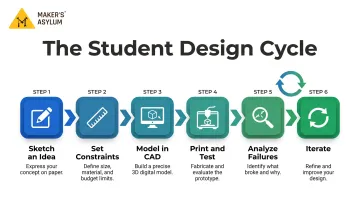
This process mirrors how professionals in engineering and product design work every day. It develops critical thinking, technical troubleshooting, and comfort with ambiguity: working through problems that don't have a predetermined right answer.
That's the approach at Maker's Asylum's Innovation School in Goa. Students aged 13+ work alongside experienced mentors, accessing 3D printers and fabrication tools across a 10,000+ sq ft makerspace.
The program runs on a "Make, Break, Create" philosophy: students prototype boldly, learn from what fails, and keep iterating until they reach solutions that work in the real world.
Tips to Get Started with 3D Printing as a Student
Start with Free, Beginner-Friendly CAD Tools
Tinkercad is ideal for absolute beginners:
- Browser-based (no installation needed)
- Drag-and-drop interface
- Reached 100 million users creating 850 million designs
- Used in 160,000+ schools worldwide
Fusion 360 offers advanced capabilities:
- Free one-year education license (renewable)
- Professional CAD/CAM/CAE functionality
- Part of Autodesk Education Plan reaching 150 million students
FreeCAD is completely free and open-source:
- No sign-up, paywall, or restrictions
- Runs on Windows, Mac, and Linux
- Full parametric 3D modeling capabilities
Choose Simple, Functional First Projects
Instead of printing decorations, challenge yourself with specific problems: "Design something that organizes exactly 10 pens on my desk." Constraints force creative thinking and make learning outcomes measurable. You'll learn more from a pen holder that must fit specific dimensions than from a decorative figurine with no functional requirements.
Once you've built some confidence with functional projects, the next accelerator is community.
Find a Community
Working alone means slower feedback, fewer tools, and missed iteration opportunities. Student makers benefit enormously from:
- School maker clubs - Peer learning and shared equipment access
- Makerspaces - Professional mentorship and advanced tools
- Online communities - Printables, Thingiverse, and YouTube makers share iteration stories and provide feedback
The Maker's Asylum community spans 400+ students across 50+ cities and 40+ countries, with alumni placements at MIT, Stanford, Cambridge, and IIT. When you're surrounded by people actively building things, your own projects move faster — and the problems you choose to solve get more interesting.
Frequently Asked Questions
What are some easy 3D printing projects for students?
Beginner-friendly options include pencil holders, phone stands, fraction blocks, interlocking puzzles, and print-in-place articulated models that don't require assembly. These projects teach measurement, basic geometry, and printer operation without overwhelming complexity.
How can students use 3D printing in school projects?
3D printing enhances science models (anatomy, molecular structures), math manipulatives (fraction blocks, geometric solids), social studies dioramas (historical landmarks, artifacts), and engineering design challenges. Students turn research into tangible objects that demonstrate understanding beyond written reports or presentations.
What skills do students learn from 3D printing?
Students develop spatial reasoning, CAD and digital literacy, design thinking, iterative problem-solving, and collaboration. These are core skills in STEAM careers, from mechanical engineering to architecture and product design.
What can kids make with a 3D printer?
Age-appropriate projects range from simple geometric shapes and desk organizers to educational models, fun toys, puzzles, custom art, and moving mechanical parts. Younger students might print fraction blocks or articulated animals, while older students tackle multi-part assemblies and functional prototypes.
How is 3D printing used in science?
3D printing creates anatomy models (hearts, skeletons), molecular structures (DNA, proteins), topographic maps, solar system models, and ecology demonstrations. These turn invisible or large-scale concepts into something students can touch and explore — holding a cell organelle or tracing a mountain range's contours by hand.
What is 3D printing in simple words?
3D printing is the process of creating a physical object layer by layer from a digital design file. Similar to how a regular printer puts ink on paper, a 3D printer builds upward in three dimensions using plastic or resin material, controlled by computer instructions.